Publication
Date:
The Android Binder Framework serves as the cornerstone of inter-process communication (IPC) in Android, enabling secure and efficient interactions between apps and system services within a multi-process environment. Binder powers critical OS functionality like service discovery, remote procedure calls, and data parceling across UID-isolated processes, replacing less secure alternatives such as sockets or shared memory. Its kernel-level driver enforces process boundaries while passing caller identity (UID/PID), making it integral to Android's permission model and SELinux policies.
Process isolation forms the foundational security principle in modern operating systems, addressing the core challenge of enabling multiple processes to execute concurrently without mutual interference or compromise. Without isolation, a faulty, malicious, or compromised process could arbitrarily read from, write to, or corrupt the memory and resources of others, leading to data leaks, system crashes, or full compromise of the machine. Modern OSes solve this by assigning each process its own virtual address space, enforced through hardware mechanisms like page tables and memory management units (MMUs), so processes cannot directly access each other's memory.
Then how can two separate programs communicate with each other without compromising the system's security?
In modern computers numerous processes are running simultaneously. Each process is isolated with its own allocated memory space. Very often, it is necessary for different processes to share information with each other or coordinate their actions.
Although this might sound like a simple requirement, it brings up a variety of different challenges, such as:
Since the introduction of multitasking operating systems processes have to be isolated from each other. If processes could access each other, their memory space and data at any given time, the whole system would be at risk in terms of safety as well as security. If one process crashes, it has the capacity to crash the whole system. So how does process isolation work and more importantly how does it work in Android? Android is based on the Linux kernel. So, the Linux process architecture also applies to Android. Each process in a Linux system has a unique process ID (PID) assigned to it. The kernel uses this PID manage the process and ensures that each process has its own virtual address space assigned to it. The Memory Management Unit also ensures that each process can only access the memory space allocated to it. Accessing another processes memory is prohibited and will be blocked. Android expands on these concepts by assigning a UID. For each application installed on an Android device, a unique user ID (UID) will be assigned to the new installed app. So each Android app runs as a separate Linux user. Every app, its processes and files are therefore isolated from each other. The isolation of this data is, together with other things, also often referred to as sandbox. Further, since Android 4.3 SELinux (Security-Enhanced Linux) was introduced to strengthen the sandboxing model. SELinux operates on the principle of mandatory access control (MAC), where all access is denied by default unless it will be explicitly allowed. Even root user privileges cannot bypass this restrictions. This systemwide security policies control all processes. But this isolation also brings a disadvantage.
Processes have to communicate with each other. If processes couldn't communicate with each other, modern applications would be much more limited. One example is the camera application on an Android phone. Imagine a scanning app that enables the user to scan a QR code. The application could either implement a limited camera functionality within itself or simply use an existing camera application, which are usually preinstalled on modern devices. Usually, the latter solution will be utilized. In order to access the camera application, the process of the QR scanner app must be able to communicate with the process of the camera application. Furthermore, the camera app must be able to send data, the photo of the QR code, back to the QR scanner app. But how can two isolated processes communicate with each other?
Although the QR scanner app and the camera are rather modern examples, the need for the ability of isolated processes to be able to communicate with each other is much older, and so are the different solutions. The first approach was using a dedicated shared storage area. In Linux, the /tmp directory was often used for exchanging data between processes. This approach, however, lacked any form of security in comparison to modern standards. There were no protection or authorization mechanisms for the data. So any process, even ones for which the data was not originally intended, could read or even alter the stored data there.
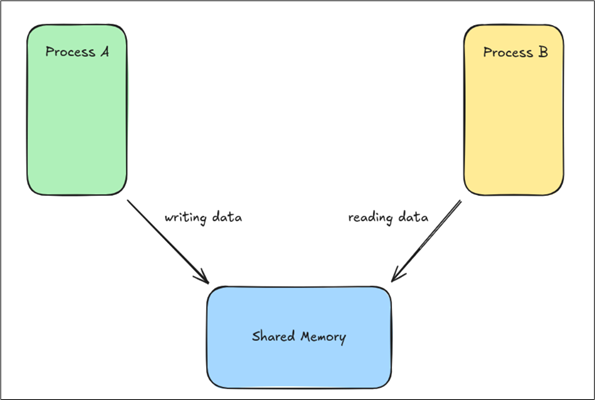 Figure 1: Two separate processes accessing a shared memory space (simplified)
This does not mean that this approach is no longer used. In Android, there is actually a shared space where applications can store files, so other apps are able to access them. However, that is not the data that processes have to exchange in order to work properly. As already mentioned, the shared space for data exchange between processes was only the first approach. There have been many different follow-ups, one of them being the UNIX Pipes, which are still used today. Today, Android uses a more complex system for the interaction between processes. This system is called Binder.
Binder enables direct communication between two isolated processes in a more secure way. So, instead of using a shared space, the interaction is done directly. But how? Going back to the example with the QR Code Scanner app. The Scanner app requests a photo from the camera app. For now, in a very simplified depiction, binder acts as a sort of middleman for the inter process communication (IPC) requests and responses.
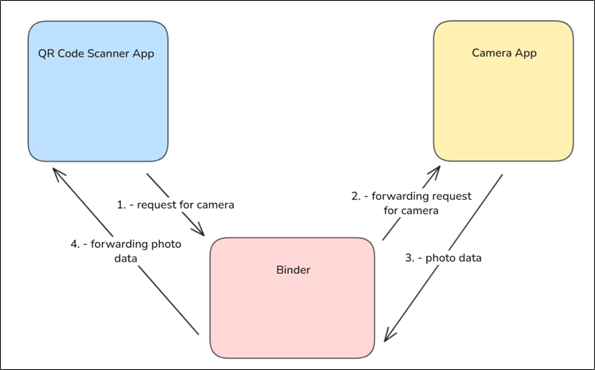 Figure 2: Two applications interact with each other by using Binder
So for now, each inter process communication (IPC) within Android is done via this Binder program. But what exactly is this Binder? Is it another application, preinstalled on each Android device?
The answer is no. It goes much deeper!