Updates
Date:
Binder or more accurately, the Binder Framework is the main interprocess communication system in Android. The Binder Framework predates the Android operating system. Its origin comes from the OpenBinder project, which was ported to Linux in the year 2005 (see the references for more information). OpenBinder was used as is, in the early versions of Android, but was completely rewritten in 2008.
The Binder Framework actually consists of many different components. What follows is the structure of the Binder Framework and the terminology of the components.
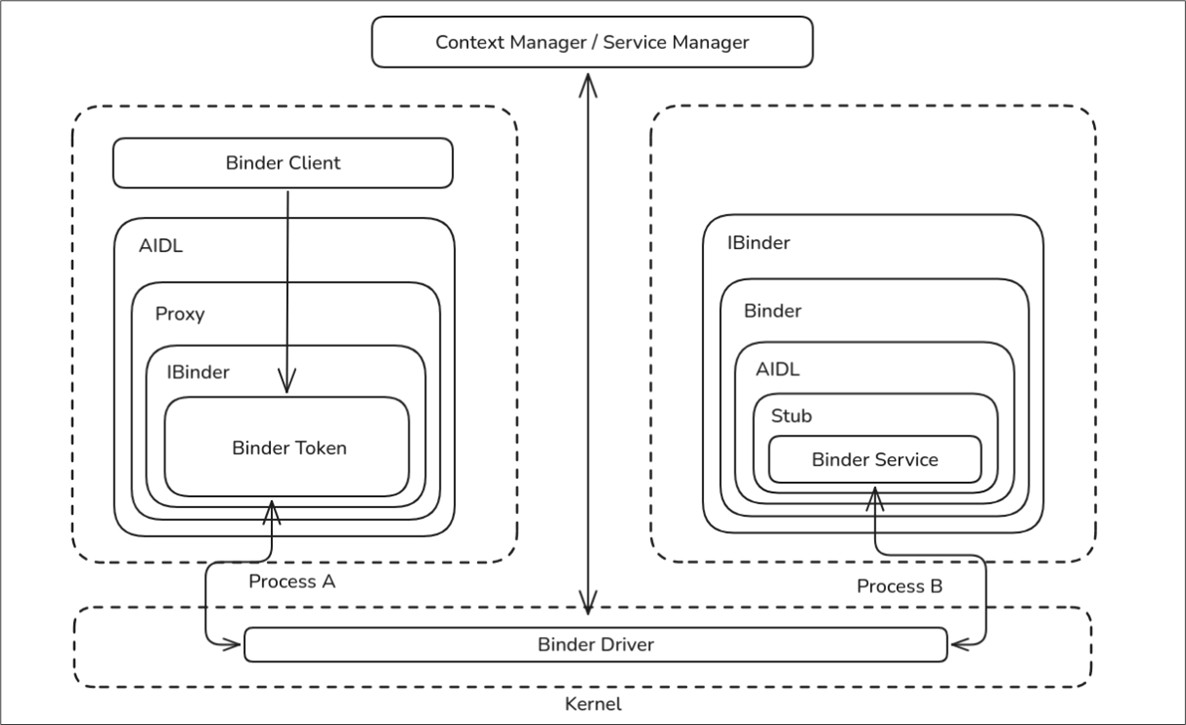 Figure 1: Structure of the Binder Framework
| Name | Description |
| Binder Driver | Within its core, there is the Binder Driver as part of the Android's Linux Kernel. The Binder Driver is responsible for transferring data from one process to another. |
| Binder Protocol | The Binder Protocol is a low-level protocol. It is based on ioctl and used for the communication with the Binder Driver. |
| IBinder Interface | The IBinder interfaces is a Java / Kotlin interface which defines methods for the Binder objects. Those are required, so an Android application can actually perform an IPC communication. |
| Binder (Object) | The Binder Object is a generic implementation of the IBinder interface. |
| Binder Token | An abstract 32-bit integer value that is used as unique identifier for a Binder object across all processes on the Android operating system. |
| AIDL | The Android Interface Definition Language is used to describe business operations on an IBinder interface. |
| Binder Service | The Binder Service is an actual implementation of the Binder object. A Binder service can be created by using the AIDL and then implementing the defined business operations. The Binder Service is the component an app actually interacts with. If an app requires the location, it will interact with the Binder Service for the location. |
| Binder Client | The Binder Client is the object that wants to use the functionality offered by a binder service. For example, the component of the QR Code Scanner App that requests the camera functionality of an installed camera app. |
| Binder Transaction | An act of invoking an operation, i.e. a method, on a remote Binder object, which may involve sending/receiving data, over the Binder protocol. |
| Parcel | The container for a message (data and object references) that can be sent through an IBinder. A unit of transactional data - one for the outbound request, and another for the inbound reply. |
| Marshalling | The procedure for converting data structures that include primitives such as Integers or doubles, as well as, higher-level data structures, such as objects, into parcels for the purpose of embedding them into the Binder transaction. |
| Unmarshalling | The procedure of reconstructing primitive or higher-level data structure from parcels, received through a Binder transaction. |
| Proxy | An implementation of the AIDL interface that un/marshals data and maps method calls to transactions submitted via a wrapped IBinder interface to the Binder object. |
| Stub | A partial implementation of the AIDL interface that maps transactions to Binder service method calls while un/marshalling data. |
| Context Manager (servicemanager): | A special Binder object that is used as a registry/lookup service for other Binder objects (name --> handle mapping). The Context Manager enables the discovery of other Binder Services on the operating system. |
How does communication with the Binder Framework actually work? We may examine this question from different perspectives. Each consecutive perspective will take us deeper into the internals of Android.
Let's start with a QR Code Scanner app as the Client. In this context, the Client is the application that calls the functionality of another application, such as the Camera application. To scan a QR Code, the QR Code Scanner app uses an implemented function for interacting with the camera. From a simplified, abstract perspective, the communication would look like the sketch below.
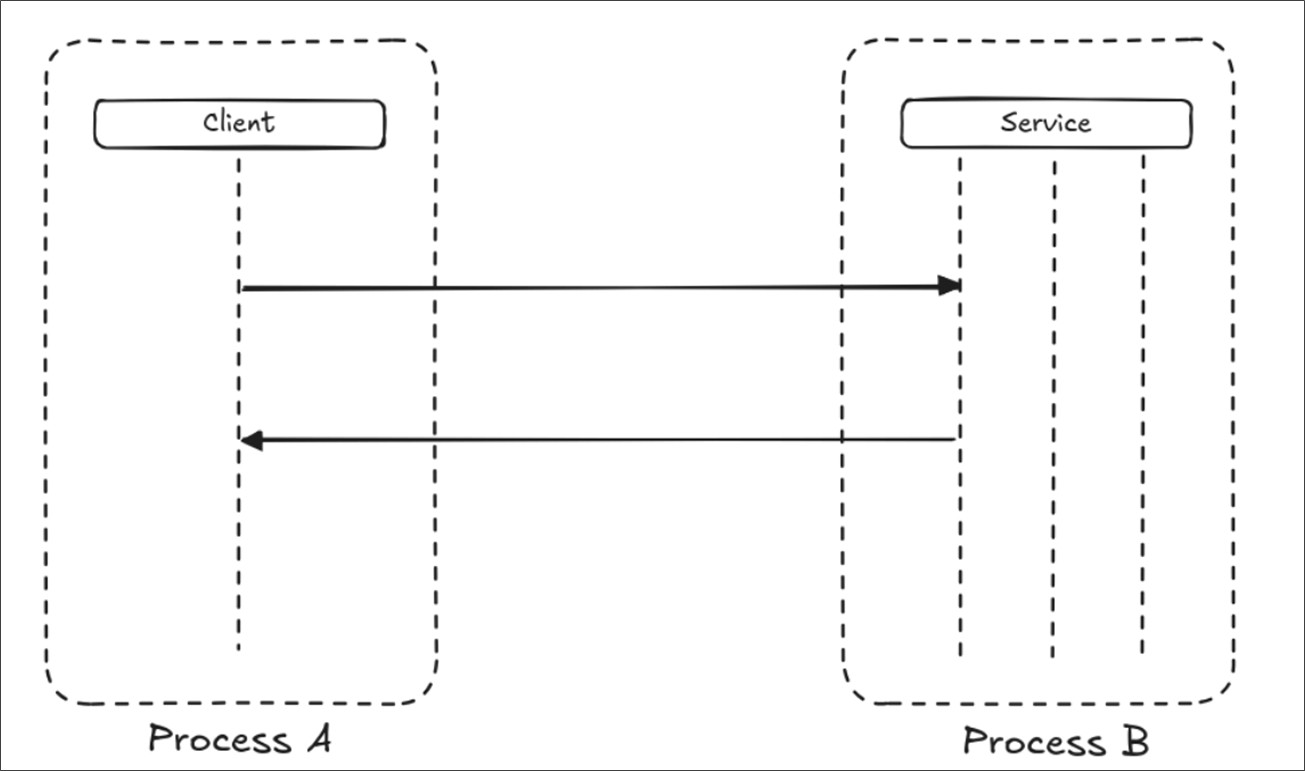 Figure 2: Interprocess communication from the client’s perspective
However, as already mentioned, direct communication between processes is not possible. To exchange data with another process a third party must be involved.
During development, there are various higher-level APIs and functions, which make this sort of inter-process communication easy to implement. As already mentioned, processes cannot interact with each other directly, due to process isolation. So, instead of a direct interaction, the kernel will act as a broker between the processes, with the Binder Driver as its communication interface.
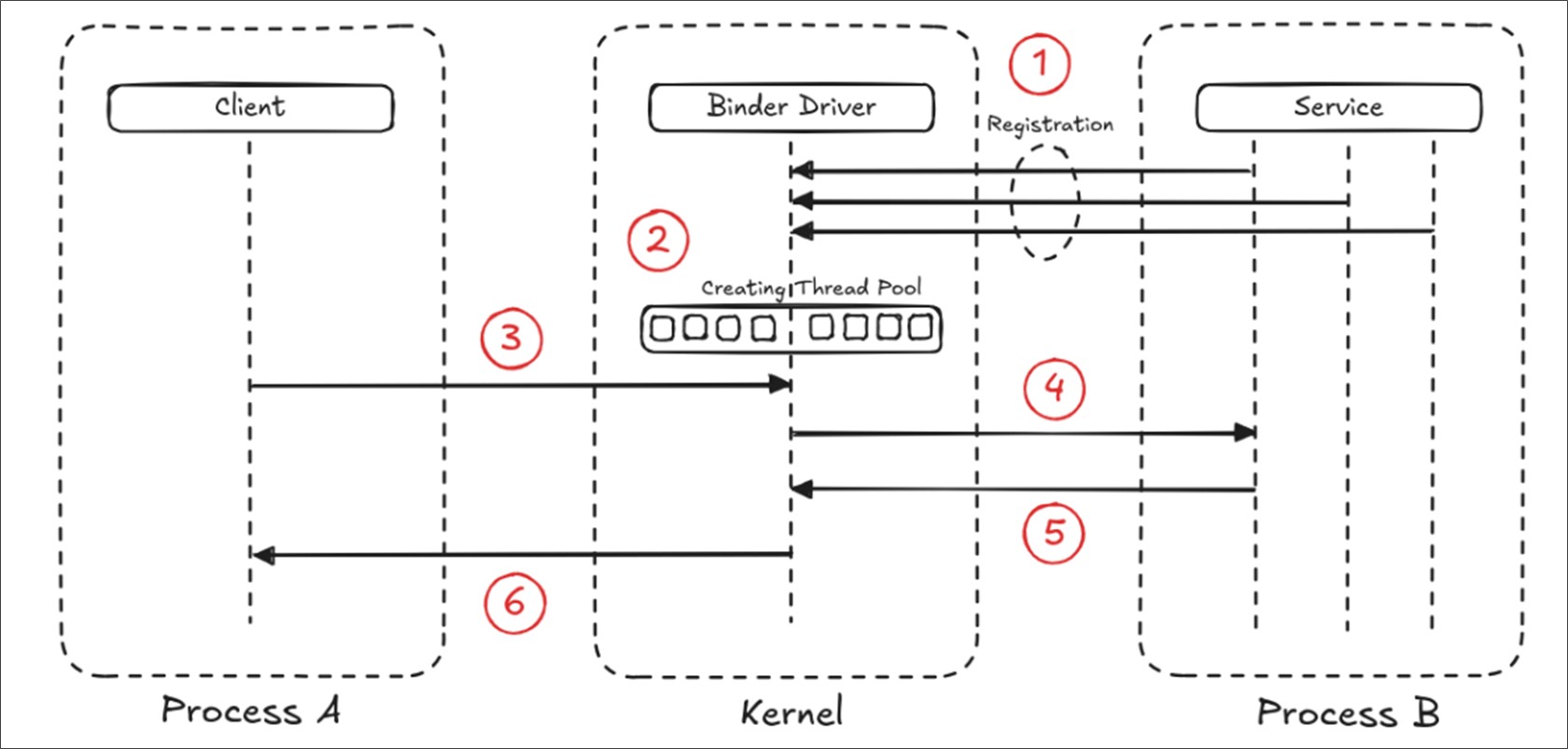 Figure 3: Simplified representation of process communication using the Binder Driver
Typically, a service that will be accessible to clients will register itself with the Binder Driver (1). This will spawn special threads (Thread Pool), which will be blocked on the Binder Driver and are waiting for callbacks to do the work (2). So, when a client requires access to a service’s functionality, it will send a message to the Binder Driver (3). The Binder Driver will then find the appropriate and registered service, to serve that message. The Binder Driver unblocks one of the service threads. That thread will then handle the request (4). Now, another thread will be unblocked, and the service sends the response back to the Binder Driver using the new unblocked thread (5). Once the response is sent, the thread will be blocked again, and the Binder Driver will send the response to the client (6).
It should be noted that the service might get concurrent requests from multiple clients. Because of this it needs to synchronize access to its mutable states. The Binder driver is exposed via /dev/binder and offers a relatively simple API based on open, release poll, mmap, flush and ioctl operations.
Most of the communication happens through the ioctl(binderFd, BINDER_WRITE_READ, &bwd) function of the Binder Driver. The structure bwd is defined as:
struct binder_write_read {
signed long write_size; // bytes to write
signed long write_consumed; // bytes consumed by the driver
unsigned long write_buffer; // service response commands
signed long read_size; // bytes to read
signed long read_consumed; // bytes consumed by the driver
unsigned long read_buffer; // client request commands
}
The moment a service registers itself with the Binder Driver, the binder_write_read structure will be sent to the driver with an empty write_buffer. When a client then requests the service through the driver, the driver will copy the request from the client into the read_buffer and add the size of the read_buffer into the read_size. The driver will then unblock a thread and send the structure to the service. The service will read the read_buffer and execute the commands. If these commands produce a result, it will be stored into the write_buffer and the buffers size is placed into the write_size. Then the structure will be sent back to the Binder Driver.
The write_buffer also contains a series of commands for the driver to perform book-keeping commands, e.g., increment/decrement binder object references, request/clear death notifications and more. It also performs the commands that require a response, such as BC_TRANSACTION. On return, the read_buffer will contain commands for the user-space to perform the same book-keeping commands. In addition, it performs a command to request the processing of the response (i.e. BC_REPLY) or a request to perform a nested (recursive) operation. In simpler terms, the entire interaction between two services is just the exchange between these two buffers.
All of this ioctl communication is done on the driver level, which is very low level. During the development of an application, none of these commands actually matter, due to the abstraction of this layer by the native library libbinder. In fact, clients and services do not know anything about the ioctl Binder protocol or even the libbinder. Therefore the Proxy and Stubs are used.
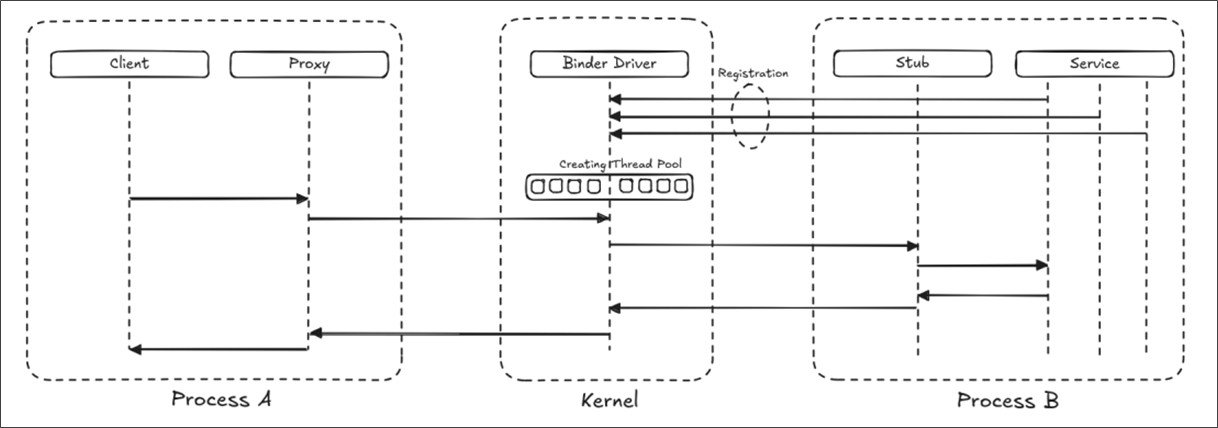 Figure 4: Interprocess communication with the Binder Driver via Proxy and Stub
So, what do the Proxy and Stub components actually do?
Most clients are predefined Java or Kotlin functions that are designed to facilitate high-level programming. As far as developers are concerned, the only thing they want to do, is send and receive messages to and from another service or process. That's where the Proxy and Stub come into play.
The job of the proxy is to take the high level Java request from the client and convert it into a parcel. A parcel is a container for either primitive data or an object reference. The parcel structure is then submitted in an ioctl transaction to the Binder Driver and the Thread Block. The process of transforming primitive data types such as Integers, Doubles or Object references, such as Strings or a custom class is called Marshalling. On the other side of the Binder Driver, the Stub component does the procedure called Unmarshalling, which is basically the reverse operation of the Marshalling. The parcel structure will be transformed into a data structure the service is able to interpret. Then the appropriate method in the service will be called.
In fact, most clients don't even know that they are using an IPC, never mind a Binder, or a Proxy. During development developers use defined classes and methods that act as managers to abstract all that complexity.
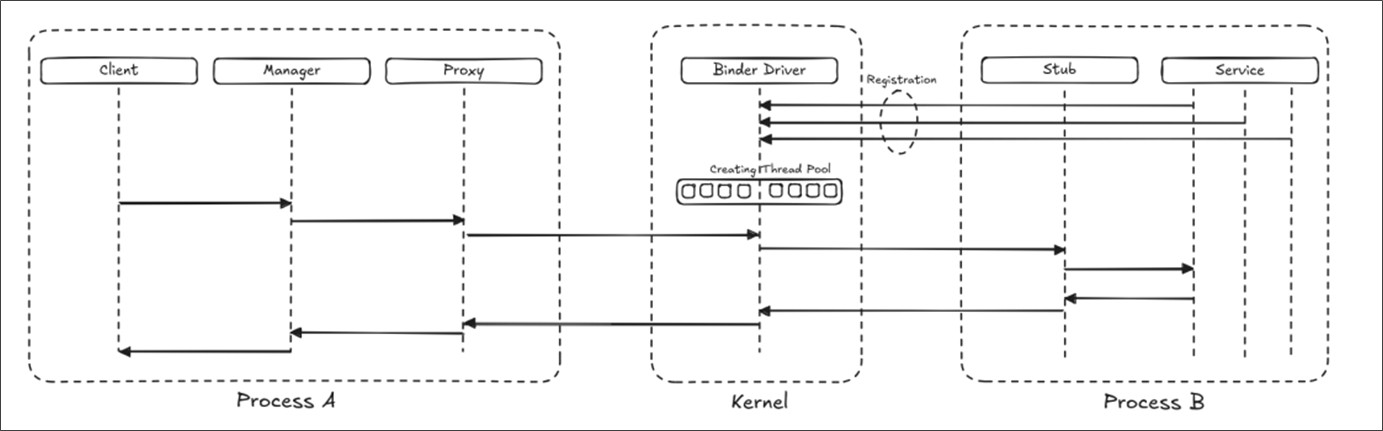 Figure 5: Interprocess communication via Binder Driver by using a manager component
The use of Managers is particularly true for system services, such as the location or the battery status. Those services will typically expose a subset of their APIs to the clients via their Managers. A Managers job is to be a proxy to a proxy. It will facilitate the discovery of a service, which clients want to interact with and hides the binder interaction completely from it.
If a client wants to interact with the location service, it will use a Java/Kotlin object. This object will then convert the objects method calls into binder method calls via proxy. Managers are also responsible for handling exceptions or different thread issues.
But how does a client get a handle to the service it wants to talk to?
How does an application (a client) find the service it wants to interact with? The answer is, by asking the servicemanager, also called the Context Manager.
The Context Manager is a service that registers itself with the Binder Driver (1). Each new service will register itself with the Binder Driver (2). The Binder Driver will then notify the Context Manager about the new registered service. If a Client now requires the function of a Service, it will usually initialize a special Manager for this (3). Under the hood, the Manager will get the Service from a Proxy. The Proxy will then contact the Binder Driver to get the registered Context Manager (4). Finally, the Proxy will request the desired Service from the Context Manager (5). The Proxy then sends the received Service back to Manager (6) and the Manager will change into the state initialized (7).
Now, the Client can use the functionality of a Service, such as the location, as described before.
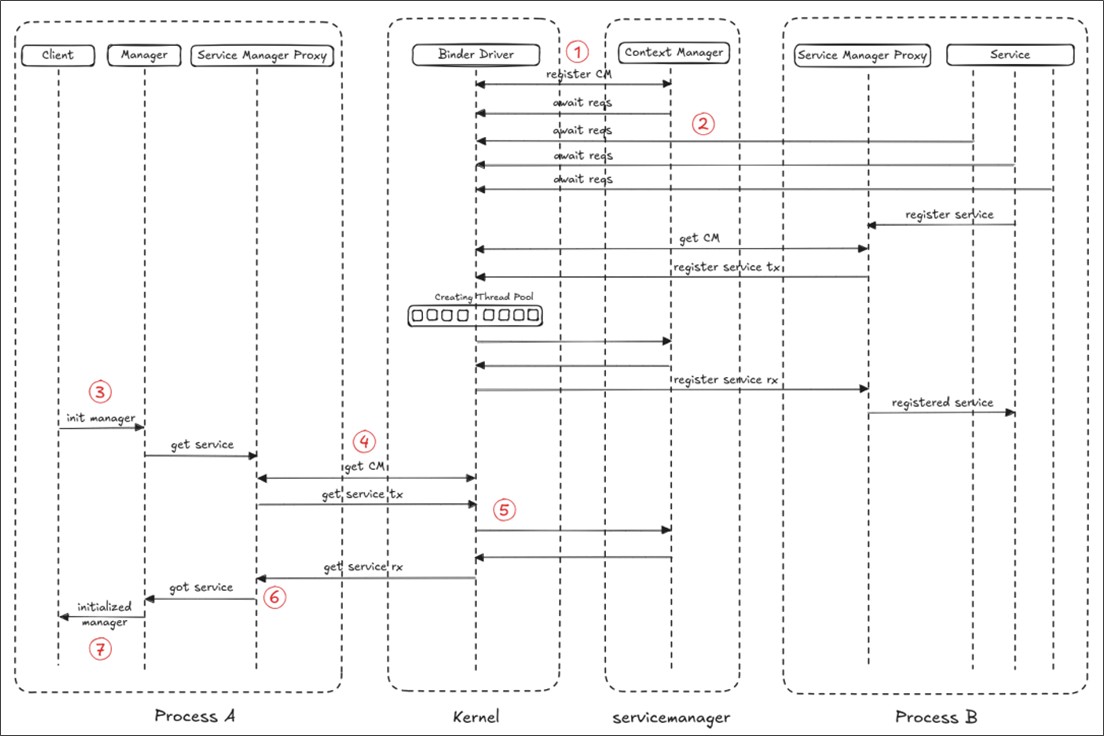 Figure 6: Process interaction from the Binder Driver by using the Context Manager
Laurie Wired
InfoQ
Hextree.io
Medium
Android
OpenBinder