Security-Column
Date:
In the first part of this series of articles, we looked at the cyber kill chain in the context of the Microsoft Cloud and analysed the first two phases, reconnaissance and initial access.
This article focuses on the enumeration phase. In this scenario, we assume that cybercriminals have already gained initial access via a compromised user account, e.g. through successful MFA phishing. You can find out more about MFA phishing in our insight into this technique.
The goal of enumeration is to identify the permissions of the compromised account and the resources that can be accessed with it. Permissions on Azure resources controlled via Role Based Access Control (RBAC) and rights within Microsoft Entra ID are particularly relevant here.
Before we dive deeper into these two permission worlds, it is important to distinguish between the different account types. Compromised identities are usually one of two account types.
Now that we have clarified the basics, the next step is to understand that an identity in the Microsoft Cloud can have permissions in different contexts. Permissions within Microsoft Entra ID and Azure Resource Manager (ARM) are particularly relevant. These two permission levels are largely independent of each other.
Specifically, this means that an account with the Entra ID role Global Reader does not have automated access to all resources in Azure. Let's start with Entra ID and use the graphical user interface for our analysis.
The Entra ID interface can be accessed in several ways. For example, via the Entra ID Admin Centre at https://entra.microsoft.com or via the Azure portal at https://portal.azure.com.
In the first step, we search for the compromised account at Users → All users and then check which roles are assigned to it in the Assigned roles tab. In our example, no roles are assigned to the compromised account. In this situation, cybercriminals would look for ways to escalate their permissions. Possible starting points are dynamic groups with insecure membership rules or app registrations where the user has permission to change login properties.
In dynamic groups, members are automatedly added based on defined rules. To identify dynamic groups, navigate to Groups → All Groups in the Entra ID portal and filter by the membership type: Dynamic. By selecting a group, you can view the associated rule under the Dynamic Membership Rules tab.
In the constructed example, a group named KeyVault-ServiceProvider can be seen. The join rule defines that all users whose user principal name (login name) contains the string serviceprovider.com are automatedly added. The specific rule is user.userPrincipalName -contains serviceprovider.com. Under the Azure role assignment menu item, we can see that this group automatically receives the Secret user for key vaults role via a key vault named KeyVault-Serviceprovider.
.png)
The purpose of this group is to automate the assignment of access to an Azure Key Vault to all employees of the external service provider. The service provider stores the system passwords for the customer in this vault. The reasoning is fundamentally understandable, as the service provider's user accounts contain the service provider's domain in the login name and are therefore clearly identifiable. However, since the join rule uses the operator "contains" rather than "ends with", there is a potential security risk. User accounts whose user principal name merely contains the string serviceprovider.com somewhere would also be added to the group. This could lead to the rule being abused or triggered unintentionally, for example through deliberately chosen login names.
After the analysis of the groups, the next step is to look at app registrations. App registrations enable applications or services to authenticate themselves to Microsoft Entra ID in order to access protected cloud resources. An app registration defines the identity of an application. Based on this registration, a service principal is created in the respective tenant, which represents the actual security identity of the application. For authentication, login information in the form of client secrets or certificates is stored in the app registration. These can be managed by the owners of the application or by accounts with the appropriate administrative permissions. Adding such login information enables authentication with Entra ID in the context of the application (e.g. using client credentials flow).
App registrations can have two different types of permissions. Delegated permissions mean that the effective rights of the application are an intersection of the rights of the logged-in user and the rights requested by the app. Such permissions only allow the app to act in combination with a user account. Application permissions, on the other hand, are independent permissions that are granted to the application independently of a user account and can thus allow the application to perform far-reaching, autonomous operations. However, an administrator of the tenant shall confirm these permissions (admin consent). It usually makes sense to only pursue applications that have application permissions.
App registrations can be viewed in the "Entra ID Admin Centre" under the corresponding menu item. In our example, we see that the compromised account has its own applications. When enumerating these, we see under API permissions that the application has the application permissions RoleManagement.ReadWrite.Directory. Since this is an application permission with admin consent granted, authentication takes place entirely in the context of the application. The permission allows the application to manage Entra ID roles for other identities, such as assigning or removing roles, independently of user rights.
.png)
Now that we have examined Entra ID, we will turn our attention to Azure, this time using PowerShell. The first thing to check is whether any subscriptions are displayed for the compromised account. Azure subscriptions are logical administrative units that control access to Azure resources, enable billing, and serve as security and authorisation boundaries within an Azure environment. If the account has no visible subscriptions, direct attacks on Azure resources are significantly restricted or impossible.
When logging in with the Azure PowerShell module (Az) via Connect-AzAccount , an automated selection of the default subscription is made if the account has multiple subscriptions available. To switch to a different subscription, the command Get-AzContext can be used to display all available subscriptions and Set-AzContext -SubscriptionId <ID> to switch to a different one.
To display all visible resources, use the command Get-AzResource. The overview that is then displayed can sometimes be very long. To get a more detailed impression of which permissions the account has for the respective resources, use the command Get-AzRoleAssignment -SignInName <Name> to read all RBAC assignments for the account. If the output is again very large, it is advisable to tidy up the output a little using pipe and Format-List Scope,RoleDefinitionName. The output will then look something like this.
.png)
As we can see here, we have the Contributor role on a VM, alongside other permissions. This role allows us to execute commands on the VM, among other things. One way to execute commands is to use the Azure Run Command of the Az PowerShell Module. It should be noted that individual commands cannot be executed directly, only scripts. In this example, a script was used that consists of only a single line with the command whoami.
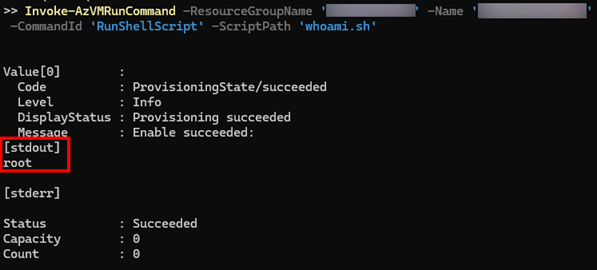
It can be observed here that the commands executed via Run Command are usually processed with system rights. On Windows, this usually means NT AUTHORITY\SYSTEM, and on Linux, it typically means root.
Upon further examination of the virtual machine using the command Get-AzVM -ResourceGroupName <GroupName> -Name <VMName> | FL *, an assigned managed identity is noticeable. Managed identities are special forms of service principals and, similar to user accounts, can be assigned RBAC permissions and other authorisations.
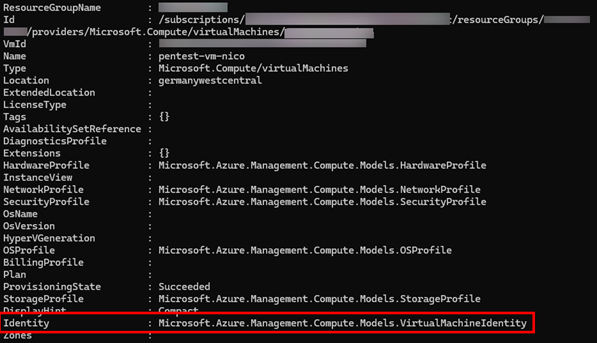
In combination with the Run command, it is possible to request a valid JWT token and then use it to log in. This makes it possible to use the associated managed identity and abuse its permissions for further actions within the environment. More on this in the next instalment of this series.
Conclusion
During the enumeration phase, we identified several ways in which we could extend our rights and/or compromise other identities. In the third part, we will take a closer look at the subsequent phases, privilege escalation and lateral movement.